Bubble Wrap Brush Strokes: A Practical Guide for Digital Crafters
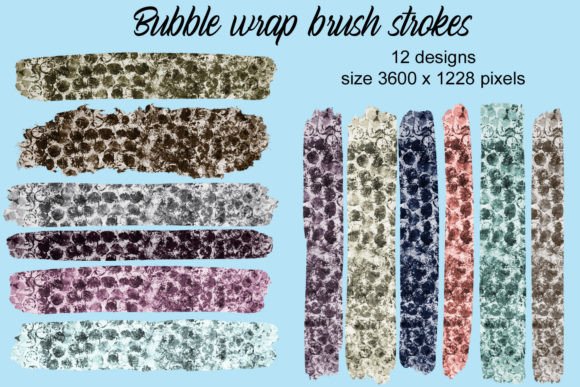
In the evolving landscape of digital design and DIY crafting, texture plays a pivotal role in adding depth and personality to visual projects. Bubble Wrap Brush Strokes represent a specific niche within this domain, offering designers and hobbyists a unique way to incorporate tactile, three-dimensional aesthetics into two-dimensional media. This collection consists of 12 distinct brush strokes rendered in various colors, designed to mimic the appearance of popped or intact bubble wrap. Understanding the technical specifications, potential applications, and limitations of these assets is essential for determining whether they align with your creative workflow.
Understanding the Asset Specifications
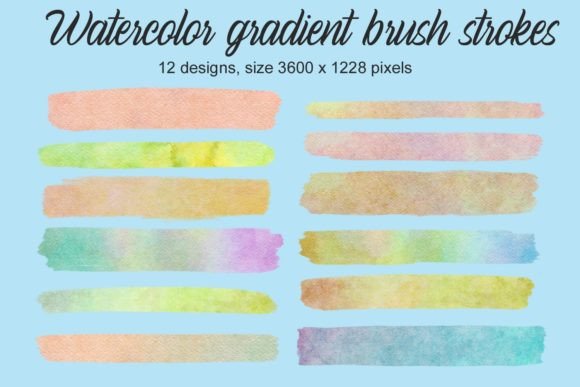
Before integrating any digital asset into a project, it is crucial to evaluate its technical foundation. The Bubble Wrap Brush Strokes are provided as high-resolution images, specifically sized at 3600 × 1228 pixels. This resolution is significant because it offers flexibility across different mediums. For digital use, such as web graphics or social media content, these dimensions provide ample detail without excessive file weight. For physical applications, such as sublimation printing on mugs or tumblers, the pixel density allows for scaling down while maintaining crisp edges and clear texture details.
The collection includes 12 variations, each featuring different colors. This variety eliminates the need for manual recoloring in post-production software, although advanced users may still choose to adjust hues to match specific brand palettes. The pre-colored nature of these brushes makes them accessible to beginners who may not be proficient in complex photo editing techniques, while still offering utility for experienced designers seeking efficiency.
Primary Applications and Use Cases
The versatility of these brush strokes extends beyond simple graphic embellishment. Their primary value lies in their ability to bridge the gap between digital design and physical craft. Below are several contexts where these assets prove particularly effective:
- Invitations and Stationery: Adding a bubble wrap texture can introduce a playful, modern element to birthday invitations, baby shower announcements, or casual event cards. The texture suggests a sense of fun and informality.
- Scrapbooking and Planner Stickers: For digital scrapbookers or those creating printable planner stickers, these strokes serve as excellent decorative borders or background accents. They add visual interest without overwhelming handwritten notes or photos.
- Sublimation Projects: One of the strongest use cases for high-resolution brush strokes is sublimation printing on hard goods. When applied to mugs, tumblers, or phone cases, the bubble wrap pattern can create a striking visual contrast against solid backgrounds. The clarity of the 3600-pixel width ensures that the print remains sharp even on curved surfaces.
- Font and Typography Enhancements: Designers often use textured brushes to mask or overlay text, creating a custom typographic effect. These strokes can be used to highlight specific words or create a cohesive theme across a branding package.
Evaluating Benefits and Tradeoffs
When considering the adoption of Bubble Wrap Brush Strokes into your toolkit, it is important to weigh the advantages against potential limitations. On the benefit side, the immediate availability of a realistic texture saves considerable time. Creating a convincing bubble wrap effect from scratch using vector tools or layer styles in software like Adobe Photoshop can be time-consuming and technically demanding. These pre-made assets offer an instant solution.
However, there are tradeoffs to consider. Because these are raster-based images (pixels) rather than vector files, they have a fixed resolution. While 3600 × 1228 pixels is generous, it may not be sufficient for large-format printing, such as banners or wall murals, where upscaling could result in pixelation. Additionally, the predefined colors may not always match exact corporate branding requirements, necessitating additional editing work if precise color matching is critical.
Another consideration is the stylistic fit. Bubble wrap is inherently casual and playful. It may not be suitable for formal corporate reports, luxury branding, or minimalist designs where clean lines and negative space are prioritized. Users must assess whether the whimsical nature of the texture aligns with the tone of their specific project.
Decision-Making Insights for Buyers
To determine if this collection is the right choice for your needs, consider the following questions:
- What is my output medium? If you are primarily working on digital screens or small-to-medium physical items like mugs and stickers, the resolution is ideal. If you require large-scale prints, you may need to look for vector alternatives or higher-resolution source files.
- How much time do I have? If you need quick, ready-to-use elements, this collection offers high efficiency. If you enjoy the process of building textures from scratch, you might prefer creating your own assets to have full control over every detail.
- Does the aesthetic match my audience? Evaluate your target demographic. Younger audiences or those interested in crafts, DIY, and playful designs will likely respond positively to the bubble wrap motif. More conservative audiences may find it distracting.
Comparing Alternatives
While Bubble Wrap Brush Strokes offer a specific look, it is worth exploring alternatives depending on your project goals. Vector-based clipart offers infinite scalability but often lacks the realistic depth and shadowing that raster brush strokes provide. Conversely, photographing actual bubble wrap gives you complete control over lighting and angle but requires photography equipment, editing skills, and consistent lighting conditions to achieve a professional look.
For users who find the bubble wrap theme too narrow, exploring broader texture packs might be beneficial. However, if the goal is to achieve a specific trendy, tactile look associated with packaging and protection metaphors, dedicated brush strokes remain the most efficient route.
Expanding Your Creative Toolkit
For those who find value in this specific texture, it is often useful to maintain a cohesive design language across multiple projects. Visitors are encouraged to look in the store for other Bubble wrap products. Expanding your library with complementary assets—such as patterns, icons, or background sheets—can streamline the design process and ensure consistency across different media types, from digital invitations to physical merchandise.
In conclusion, Bubble Wrap Brush Strokes serve as a practical, high-quality resource for crafters and designers focused on small-to-medium scale projects. By understanding the resolution limits and stylistic implications, users can effectively leverage these assets to enhance invitations, sublimation prints, and digital crafts with minimal effort and maximum visual impact.